- Published on
- 13 min read
CellPAINT: The Free Tool That Turns Molecular Biology Into Art
- Authors

- Name
- BioTech Bench
Table of contents
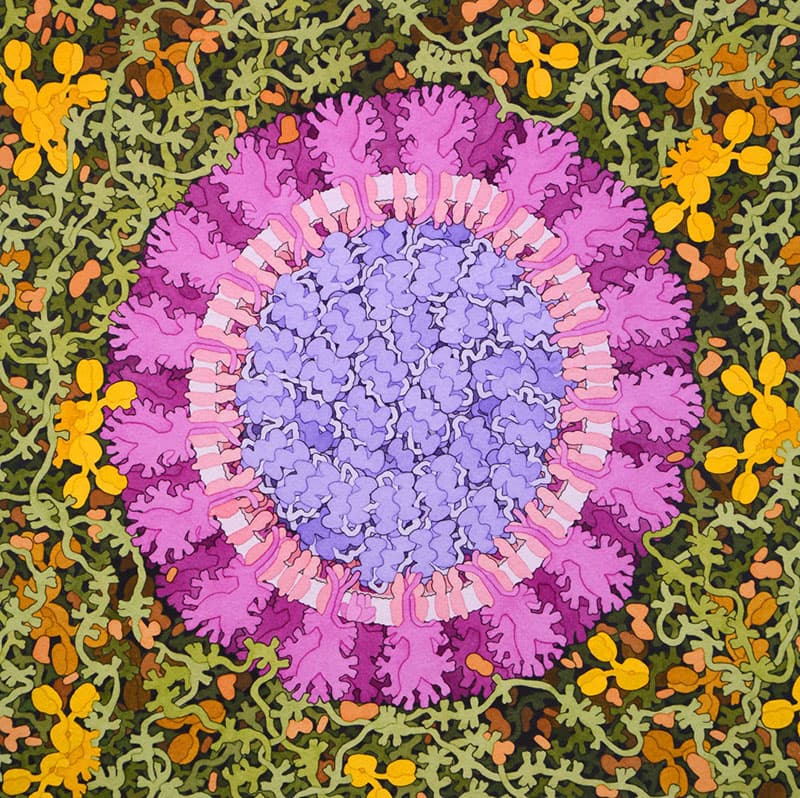
David Goodsell's watercolor-style molecular landscape of SARS-CoV-2 — the art tradition that CellPAINT puts in your hands. Image: David S. Goodsell, RCSB PDB, CC-BY-4.0.
You've seen these paintings before
You're scrolling through a journal and you stop. Not because of the title or the abstract — because of the image. A cross-section of a cell, packed with thousands of molecules in soft watercolor hues. Spike proteins bristling from a viral envelope. Ribosomes, antibodies, and lipid bilayers crowded together at the right scale, in the right proportions, looking like something that belongs on a gallery wall.
Those are David Goodsell's molecular landscapes. He's been painting them for decades — by hand, with watercolors — and they've become some of the most recognizable images in all of biology. You'll find them on the PDB's Molecule of the Month, on journal covers, in textbooks, and hanging in labs around the world.
Here's the thing: those paintings aren't just pretty. Every molecule is drawn to scale, positioned at biologically realistic concentrations, based on real structural data from X-ray crystallography, NMR, and cryo-EM. They're accurate art. And that combination — beauty and truth in the same image — is what makes them so powerful.
What if you could create something like that yourself?
Enter CellPAINT
CellPAINT is a free, open-source tool developed at the Scripps Research Institute by David Goodsell's own team — Adam Gardner, Ludovic Autin, Arthur Olson, and Goodsell himself. It's funded by the NIH, and it does exactly what it sounds like: it lets you paint molecular scenes.
Not schematic diagrams. Not pathway cartoons. Actual molecular structures, rendered in Goodsell's signature flat-shading style, placed at the correct scale and concentration. You're essentially creating mesoscale molecular landscapes — the crowded, busy, beautiful reality of what's happening inside a cell.
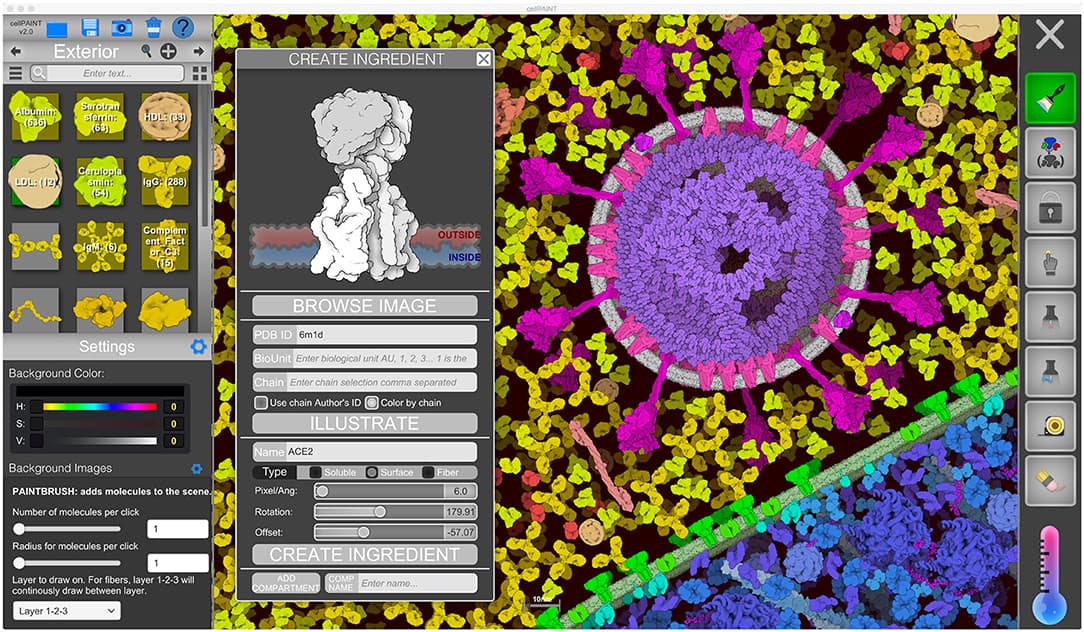
The CellPAINT 2.0 interface. On the left, your molecular palette. On the right, your canvas. In the center, the "Create Ingredient" panel lets you pull any protein from the PDB and turn it into a paintable sprite. Image from Gardner et al., 2021, CC-BY-4.0.
How it actually works
CellPAINT uses a 2.5D painting paradigm. Think of it like Photoshop, but instead of brushes that lay down pixels, your brushes lay down molecules. Each molecule is a sprite — a 2D image generated from real PDB structures — and they exist across three depth layers to give the scene a sense of depth without going full 3D.
Here's the workflow:
- Pick a scene — CellPAINT ships with preset recipes for HIV virions, blood plasma, T-cell surfaces, and mRNA vaccine components
- Choose your molecules — Browse the palette on the left. Each "ingredient" is a real molecular structure with its name, PDB ID, and copy number
- Paint — Click and drag to place molecules into your scene. The physics engine (Box2D) handles collisions, so proteins bounce off each other and settle into realistic positions
- Customize — Adjust the temperature slider to control diffusion speed. Group molecules into assemblies. Lock portions of your scene to build complex compositions
The physics engine is key. Molecules don't just float statically — they jostle, diffuse, and respect each other's boundaries. Membrane-bound proteins stay embedded in lipid bilayers (they literally ride the membrane like trains on tracks). Fibers like DNA behave as articulated chains with persistence length. It feels like you're painting biology.
Import any protein from the PDB
This is where CellPAINT gets really powerful. The "Create Ingredient" panel lets you type in any PDB ID, and the software automatically:
- Fetches the structure from the Protein Data Bank
- Determines the best viewing angle from the longest molecular axis
- Renders it as a Goodsell-style sprite using the Illustrate software
- Lets you configure whether it's soluble, membrane-bound, or a fiber
You can also import your own PNG images if you want full creative control. This means CellPAINT isn't limited to the preset molecules — you can build scenes with any structurally characterized protein.
What you can create
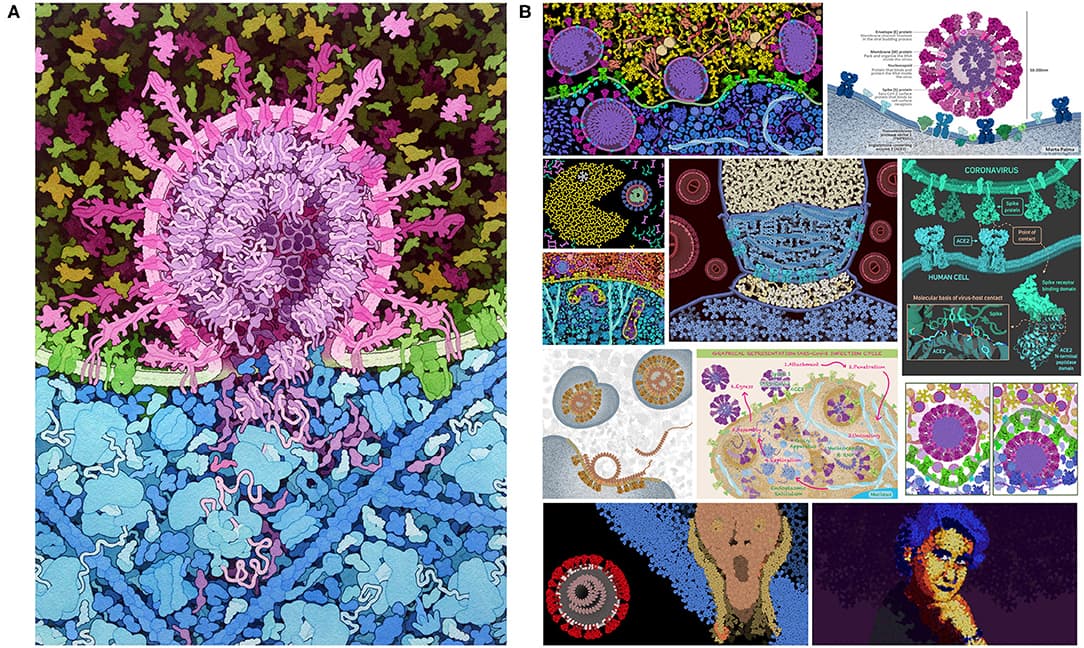
Left: A CellPAINT illustration of SARS-CoV-2 fusing with a host cell membrane. Right: Gallery of user-submitted CellPAINT artwork from educational contests — proof that non-experts can create scientifically accurate, visually stunning molecular scenes. Image from Gardner et al., 2021, CC-BY-4.0.
The preset scenes give you a taste of what's possible:
- HIV in blood plasma — Viral particles surrounded by antibodies, albumin, and complement proteins at realistic concentrations
- T-cell surface — The dense forest of receptors and glycoproteins on an immune cell
- mRNA vaccine — Lipid nanoparticles packed with mRNA, surrounded by the immune players they're designed to activate
- Custom scenes — Import your favorite protein and build whatever molecular story you want to tell
People have used CellPAINT for journal figures, educational materials, grant presentations, and even art contests. The images it produces have that unmistakable Goodsell aesthetic — scientifically grounded, visually striking, and immediately recognizable.
A research tool, not just an art tool
Here's something that surprised me: CellPAINT isn't just for making pretty pictures. The Goodsell lab has demonstrated its use as a genuine research tool for interpreting cryo-electron tomography data.
The workflow goes like this: you import a 2D slice from a cryo-ET tomogram as your background image, then paint known protein complexes over the densities you see. It becomes a way to test hypotheses — "could this blob be the TIM/TOM translocase complex?" — by checking whether the molecular dimensions and shapes actually fit.
It's not a replacement for proper computational fitting, but as a quick, visual hypothesis-generation tool? That's genuinely useful.
The honest downsides
CellPAINT is a passion project from a small academic team, and it shows in some areas. Here's what you should know:
- Performance ceiling — The Unity engine starts struggling at around 2,000 soluble molecules. For very large scenes (like a full cell cross-section), you'll need to use the locking tool to freeze completed sections
- No undo — This one hurts. Because the physics simulation runs continuously, implementing undo is technically complicated. Save often
- 2.5D limitations — Membranes are always viewed perpendicular to the canvas. You can't tilt or rotate the viewing angle. Fibers are limited to three depth layers. If you need true 3D, this isn't the tool
- Rough edges — Save/load can be finicky (the web version only handles zip files). Some buttons need multiple clicks. The documentation is helpful but incomplete in places
- Web vs. standalone — The web version runs in your browser but has some limitations. The standalone version (available on SourceForge) is more stable but requires a download
These are real limitations, not dealbreakers. For what CellPAINT does — putting scientifically accurate mesoscale illustration in the hands of non-experts, for free — there's simply nothing else like it.
How CellPAINT compares to the alternatives
CellPAINT occupies a unique niche, but it's worth understanding where it sits relative to other tools you might reach for when you need to visualize biology.
BioRender
🔗 biorender.com | $$$ (free tier available, paid plans from ~$35/month)
BioRender is the tool most biologists think of first for scientific illustrations. It's polished, it's fast, and it has a massive library of drag-and-drop icons for pathways, cells, organs, and experimental setups.
But here's the key difference: BioRender creates schematic illustrations. A BioRender cell is a cartoon — an oval with organelles at whatever size looks good on a slide. A CellPAINT cell is a model — every molecule is to scale, at the right concentration, in the right compartment. They're solving fundamentally different problems.
Use BioRender when you need a clean figure for a paper showing a signaling pathway or experimental workflow. Use CellPAINT when you want to show what that pathway actually looks like at the molecular level.
- Accuracy: BioRender = schematic, CellPAINT = to-scale molecular models
- Learning curve: BioRender is easier — true drag-and-drop
- Cost: BioRender requires a subscription for publication rights; CellPAINT is completely free with no restrictions
UCSF ChimeraX
🔗 rbvi.ucsf.edu/chimerax | Free for academics
ChimeraX is the modern evolution of UCSF Chimera, and it's arguably the best tool for rendering individual molecular structures in full 3D. The visual quality is outstanding — publication-ready images of protein structures, cryo-EM maps, and molecular surfaces.
But ChimeraX works at a different scale. It excels at showing one protein (or a complex) in beautiful detail. CellPAINT works at the mesoscale — hundreds or thousands of molecules packed together in a cellular context. They're complementary tools, not competitors.
If you need a gorgeous image of your protein's active site, use ChimeraX. If you need to show that protein in the crowded context of the cytoplasm, use CellPAINT.
- Dimension: ChimeraX = full 3D; CellPAINT = 2.5D
- Scale: ChimeraX = single structures; CellPAINT = mesoscale scenes
- Learning curve: ChimeraX has a steeper learning curve with a command-line interface
PyMOL
🔗 pymol.org | Free open-source version available
PyMOL is the gold standard for molecular visualization in structural biology. If you've published a protein structure, you've probably used PyMOL to make the figures. It's incredibly flexible, scriptable, and produces clean, professional images.
Like ChimeraX, PyMOL operates at the individual-structure level. It's not designed for mesoscale scenes. You could load hundreds of PDB files and arrange them manually, but that's not what PyMOL is for, and it would take you forever.
- Scripting: PyMOL is highly scriptable (Python); CellPAINT is point-and-click
- Output: PyMOL = ray-traced 3D renders; CellPAINT = flat-shaded 2D paintings
- Use case: PyMOL for structure papers; CellPAINT for cellular context
Mol*
🔗 molstar.org | Free and open-source
Mol* (pronounced "molstar") is a web-based molecular viewer developed by the PDB consortium. It's what you see when you click "3D View" on any RCSB PDB entry. It's lightweight, runs in your browser, and handles large structures impressively well.
Mol* is great for quickly viewing and sharing individual structures, but it doesn't do mesoscale composition. There's no way to paint a scene with multiple different proteins at realistic concentrations. It's a viewer, not an illustration tool.
Inkscape + Bioicons
🔗 inkscape.org | bioicons.com | Free and open-source
For the DIY crowd: Inkscape is a free vector graphics editor, and Bioicons provides a library of 2,700+ free scientific icons in SVG format. Together, they give you unlimited creative control — but you're building everything from scratch.
This combination works well for custom schematic figures where you need precise control over layout, but it requires real graphic design effort. There's no physics engine, no automatic scaling, no PDB integration. It's the manual approach.
Quick comparison
| Tool | Scale | Style | 3D? | Physics? | Cost | Best for |
|---|---|---|---|---|---|---|
| CellPAINT | Mesoscale | Goodsell flat-shading | 2.5D | Yes | Free | Molecular landscapes |
| BioRender | Schematic | Cartoon icons | 2D | No | $$$ | Pathway diagrams |
| ChimeraX | Atomic | Photorealistic | Full 3D | No | Free (academic) | Structure rendering |
| PyMOL | Atomic | Ray-traced | Full 3D | No | Free/Paid | Structure figures |
| Mol* | Atomic | Interactive | Full 3D | No | Free | Quick PDB viewing |
| Inkscape | Any | Manual vector | 2D | No | Free | Custom schematics |
Our take
CellPAINT fills a gap that no other tool even attempts. BioRender gives you schematic cartoons. PyMOL and ChimeraX give you atomic-resolution renders of individual structures. But if you want to show the mesoscale reality of molecular biology — the crowded, jostling, beautifully chaotic interior of a cell — CellPAINT is the only game in town. And it's free.
Is it polished? No. Will you miss having an undo button? Absolutely. Is the web version occasionally flaky? Yes. But the images it produces are genuinely stunning, scientifically accurate, and unlike anything you can make in any other tool.
If you've ever looked at a Goodsell painting and thought "I wish I could make something like that" — now you can. Download the standalone version or try the web version right in your browser. Start with the HIV preset, play with the temperature slider, and watch molecules diffuse across your screen. You'll understand immediately why this tool exists.
There's something genuinely moving about seeing the molecular world rendered at the right scale. It makes the invisible visible — and beautiful. That's art and science at their best.
Have you tried CellPAINT or another molecular illustration tool? What's your go-to for making scientific figures? Drop a comment below.
Resources
| Resource | Link | Notes |
|---|---|---|
| CellPAINT (web) | ccsb.scripps.edu/cellpaint | Free, runs in browser |
| CellPAINT (standalone) | SourceForge download | Free desktop version |
| CellPAINT 2.0 paper | Gardner et al., 2021 | Frontiers in Bioinformatics |
| CellPAINT original paper | Goodsell et al., 2019 | IEEE Computer Graphics |
| Goodsell Gallery | PDB-101 Sci-Art | Free downloads, CC-BY-4.0 |
| BioRender | biorender.com | Paid, free tier available |
| UCSF ChimeraX | rbvi.ucsf.edu/chimerax | Free for academics |
| PyMOL | pymol.org | Free open-source version |
| Mol* | molstar.org | Free, web-based |
| Inkscape | inkscape.org | Free vector editor |
| Bioicons | bioicons.com | 2,700+ free science icons |
References
Gardner, A., Autin, L., Barbaro, B., Olson, A. J., & Goodsell, D. S. (2021). CellPAINT: Turnkey Illustration of Molecular Cell Biology. Frontiers in Bioinformatics, 1, 660936. doi:10.3389/fbinf.2021.660936
Gardner, A., Autin, L., Fuentes, D., Maritan, M., Olson, A. J., & Goodsell, D. S. (2018). CellPAINT: Interactive Illustration of Dynamic Mesoscale Cellular Environments. IEEE Computer Graphics and Applications, 38(6), 51–64. doi:10.1109/MCG.2018.2877076 | PMC6456043
Goodsell, D. S., Olson, A. J., & Forli, S. (2020). Art and Science of the Cellular Mesoscale. Trends in Biochemical Sciences, 45(6), 472–483. doi:10.1016/j.tibs.2020.02.010
Goodsell, D. S. (2009). The Machinery of Life (2nd ed.). Springer. — The book that popularized Goodsell's mesoscale molecular illustration style.
Pettersen, E. F., Goddard, T. D., Huang, C. C., Meng, E. C., Couch, G. S., Croll, T. I., Morris, J. H., & Ferrin, T. E. (2021). UCSF ChimeraX: Structure visualization for researchers, educators, and developers. Protein Science, 30(1), 70–82. doi:10.1002/pro.3943
Sehnal, D., Bittrich, S., Deshpande, M., Svobodová, R., Berka, K., Bazgier, V., Velankar, S., Burley, S. K., Koča, J., & Rose, A. S. (2021). Mol* Viewer: modern web app for 3D visualization and analysis of large biomolecular structures. Nucleic Acids Research, 49(W1), W431–W437. doi:10.1093/nar/gkab314
Schrödinger, LLC. The PyMOL Molecular Graphics System. pymol.org
RCSB Protein Data Bank. PDB-101 Goodsell Gallery — Molecular Landscape Illustrations. pdb101.rcsb.org/sci-art/goodsell-gallery | Licensed under CC-BY-4.0
Center for Computational Structural Biology, Scripps Research. CellPAINT Documentation & Tutorials. ccsb.scripps.edu/cellpaint
BioRender. Scientific Image and Illustration Software. biorender.com
Bioicons — Free, open-source science illustrations. bioicons.com
Inkscape Project. Inkscape: Open Source Scalable Vector Graphics Editor. inkscape.org
Keep reading
BenchOS: a free, self-hosted lab operating system for molecular and structural biology
A Harvard structural biology lab just open-sourced the software it runs its own bench on — notebook, registry, cryo-EM grid tracking, and an AI agent, all self-hosted under AGPL. I installed it and ran it. Here is what actually works, and what you should know before trusting it with your lab records.
Sanger Sequencing Analysis Tools: Free Software for Variant Calling
A practical guide to free tools for analyzing Sanger sequencing chromatograms — from .ab1 viewers to CLI variant callers.
PCR primer design: the rules, the tools, and which one to actually use
A practical guide to designing PCR primers that work — covering the rules every bench scientist should know, plus an honest comparison of the best free web tools.