- Published on
- 13 min read
AlphaFold3: how it works, and how to use it to predict your protein structure
- Authors

- Name
- BioTech Bench
Table of contents
You've been working with a protein for months. You know the sequence. You know what it does — roughly. But you have no idea what it actually looks like in three dimensions, which residues are buried, where a potential binding site might be, or why a mutation at position 47 kills the activity when position 46 doesn't matter at all.
Getting an experimental structure means years of crystallisation attempts, access to a cryo-EM facility, or a very patient collaborator. Homology modelling used to be the fallback — and if your protein shared less than 30% sequence identity with anything in the PDB, you were basically guessing.
Then AlphaFold happened.
AlphaFold3 is a free web tool from Google DeepMind that predicts protein structures from sequence alone — in minutes, not years. It's not perfect, and it has real limitations we'll get into. But for most bench scientists asking “what does my protein look like?”, it's the most useful thing to happen to structural biology in a generation. Here's how to use it.
What AlphaFold actually is
AlphaFold was built by Google DeepMind and first published in 2020. The original version — AlphaFold2 — caused a genuine stir in structural biology because it could predict protein structures with accuracy close to experimental methods, for proteins that had resisted crystallisation for decades.
AlphaFold3, released in 2024, pushed further. It's not just proteins anymore. AF3 can model protein-protein complexes, protein-DNA and protein-RNA interactions, and even predict how small molecule ligands might dock into a binding site. The inputs and outputs got richer; the underlying method got more flexible.
The key insight behind AlphaFold is that it learned protein folding by studying millions of structures already solved experimentally — all deposited in the Protein Data Bank (PDB). It learned which amino acid sequences tend to fold into which three-dimensional shapes, essentially by seeing enough examples to recognise the patterns. When you give it your sequence, it matches it against that accumulated knowledge and constructs the most probable fold.
One thing worth saying clearly upfront: AlphaFold gives you a predicted structure, not an experimental one. It's an extremely informed prediction, but it's still a model. Treat it as a hypothesis about what your protein looks like — a very useful hypothesis, but one that deserves experimental validation for anything critical.
What it can and can't predict
What AlphaFold is good at:
- Stable, folded domains with clear secondary structure
- Predicting roughly where two proteins interact (the interface)
- Flagging intrinsically disordered regions — areas that don't have a fixed shape in solution
- Giving you a starting model for homology-based analysis or molecular replacement in crystallography
What AlphaFold struggles with:
- Dynamic proteins — it gives you one static snapshot, not a conformational ensemble
- The effects of post-translational modifications — phosphorylation, glycosylation, and ubiquitination aren't modelled
- Proteins very unlike anything in the PDB — if your protein has no structural relatives, the prediction becomes less reliable
- Small molecule placement accuracy — AF3 can suggest where a ligand binds, but don't trust the exact pose without docking validation
- Membrane proteins — still challenging, though AF3 has improved here
Using the AlphaFold3 Server: step by step
The server is genuinely easy to use. Here's the full workflow from sequence to structure.
Step 1: Sign in
Go to alphafoldserver.com and sign in with a Google account. That's the only requirement — no institutional access, no paywall, no waiting list.
Step 2: Start a new job
Click "Start a new job". You'll see an input panel where you can define what you want to model.
Step 3: Add your sequence
Click "Add entity" and select Protein. Paste your amino acid sequence in single-letter code (ACDEFGHIKLMNPQRSTVWY...) into the sequence field. If you need the sequence for a protein, the easiest place to get it is UniProt — search by gene name, select your species, and copy the canonical sequence.
You can also add multiple copies of the same chain (for homo-oligomers) or add entirely different entities for complex modelling.
Step 4: Add complex partners (optional)
This is where AF3 gets interesting. If you want to model your protein in complex with something else, click "Add entity" again. Options include:
- Protein — for protein-protein complexes (e.g., antibody-antigen, receptor-ligand)
- DNA or RNA — for nucleic acid interactions
- Ligand — paste a SMILES string for a small molecule
- Ion — calcium, magnesium, zinc, etc.
For a first run, just model your protein alone. Come back to complexes once you've seen how the output looks.
Step 5: Name and submit
Give your job a name (something you'll recognise — you'll have a history of jobs), then click "Submit job". A single protein of typical length (200–500 residues) usually takes 2–5 minutes. Longer sequences and complexes take longer.
The limit is 10 jobs per day per account, which is generous for most research purposes. Results are saved in your job history for 30 days.
Step 6: View the results
When your job finishes, you'll see the results page with three key outputs:
The 3D structure viewer — an interactive molecular viewer (Mol*) embedded directly in the browser. You can rotate, zoom, and inspect the structure. The residues are colour-coded by confidence (more on this below).
The pLDDT plot — a graph showing per-residue confidence along the sequence. Peaks and valleys in this plot tell you at a glance which regions are well-predicted and which aren't.
The PAE (Predicted Aligned Error) plot — a matrix showing confidence about the relative positions of residue pairs. This is most useful for multi-domain proteins and complexes (more below).
Step 7: Download the structure
Click "Download" to get the structure file. AF3 outputs in mmCIF format (the modern replacement for PDB format). Most structure viewers can open both — if you're using PyMOL, it reads mmCIF fine. You can convert to PDB format with PyMOL or online converters if needed.
Reading the confidence scores
This is the part most people find confusing — and it's the most important part of interpreting an AlphaFold result. Don't skip it.
pLDDT: per-residue confidence
pLDDT stands for predicted Local Distance Difference Test. It's a score from 0–100 assigned to every residue in the structure, telling you how confident AlphaFold is about the position of that residue. The structure viewer colour-codes residues by pLDDT automatically.
| pLDDT score | Colour in viewer | What it means in practice |
|---|---|---|
| > 90 | Dark blue | Very high confidence — the structure here is likely accurate |
| 70–90 | Light blue | Confident — generally reliable, minor positional uncertainty |
| 50–70 | Yellow | Low confidence — treat with caution, don't over-interpret |
| < 50 | Orange / red | Very low — this region is likely disordered or the prediction is unreliable |
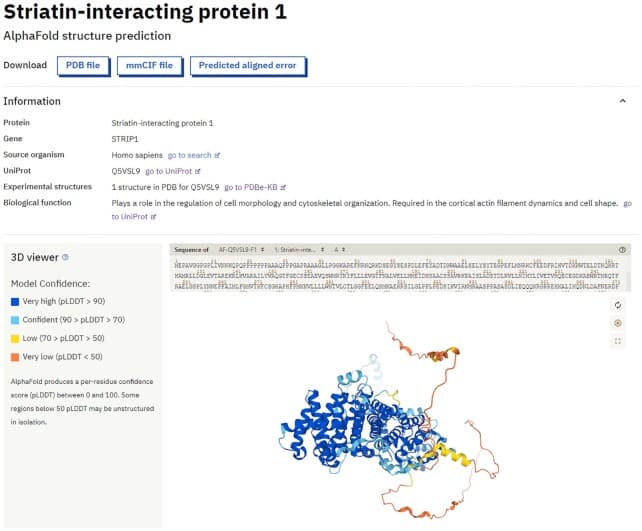
Figure 1. Protein structure displayed in the AlphaFold Database viewer, coloured by per-residue pLDDT confidence score. Dark blue = very high confidence (>90); light blue = confident (70–90); yellow = low confidence (50–70); orange/red = very low, likely disordered (<50). Adapted from Varadi M et al. (2022). AlphaFold Protein Structure Database: massively expanding the structural coverage of protein-sequence space with high-accuracy models. _Nucleic Acids Research, 50(D1):D439–D444. doi:10.1093/nar/gkab1061, under CC BY 4.0._
A few things to know about pLDDT:
Low pLDDT often means disordered, not wrong. When a region scores below 50, AlphaFold is usually telling you that the sequence doesn't fold into a stable structure — not that the algorithm failed. Many proteins have intrinsically disordered regions (IDRs) that are biologically important. If your loop or termini score orange/red, that's useful information — it means that region is probably flexible in solution.
Don't design experiments based on low-confidence regions. If you're planning a mutagenesis experiment or trying to design a binding interface, focus on the high-confidence (blue) regions. A predicted helix in the yellow zone might not actually be a helix.
High average pLDDT is a good sign, but check the specific region you care about. A protein with 85% average pLDDT might have a key active site residue in a 55-pLDDT loop. Always look at the local score, not just the average.
PAE: confidence about relative positions
PAE (Predicted Aligned Error) is shown as a 2D matrix — residue pairs on both axes, colour showing the expected error (in Ångströms) if you were to align one residue and check where the other lands. Darker = lower error = more confident about relative position.
For a single compact domain, the PAE matrix looks uniformly dark (confident everywhere). Multi-domain proteins look different: you'll see dark squares along the diagonal (each domain is internally well-predicted) but lighter off-diagonal regions (the relative orientation between domains is uncertain).
For complexes, the PAE matrix is the key output. Dark off-diagonal blocks between the two chains mean AlphaFold is confident about how the two proteins are positioned relative to each other — that's a sign the predicted interaction interface is reliable. Light off-diagonal blocks mean the complex arrangement is uncertain, even if each individual chain is well-predicted.
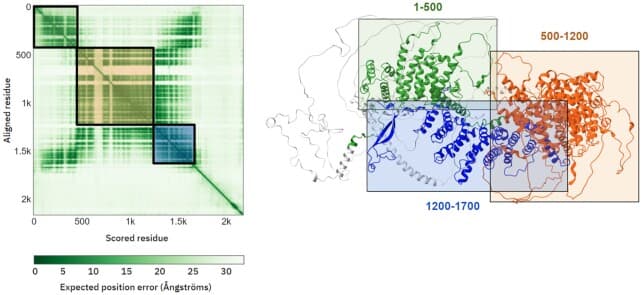
Figure 2. Predicted Aligned Error (PAE) matrix from AlphaFold. Darker colours indicate lower expected error (higher confidence) in the relative positions of residue pairs. Dark squares along the diagonal = confident within each domain; lighter off-diagonal regions = uncertainty about inter-domain or inter-chain arrangement. Adapted from Varadi M et al. (2022). AlphaFold Protein Structure Database: massively expanding the structural coverage of protein-sequence space with high-accuracy models. _Nucleic Acids Research, 50(D1):D439–D444. doi:10.1093/nar/gkab1061, under CC BY 4.0._
What to do with your structure
Once you have a confident structure, here are the most common things bench scientists actually do with it.
Find putative binding pockets and active sites. Look for concave regions on the protein surface — these are candidate binding sites. Tools like CASTp or PyMOL's surface view can help identify pockets from your structure file.
Identify disordered regions before you start cloning. If you're planning to express a fragment of a larger protein, check the pLDDT plot first. A construct that includes a large disordered region (pLDDT < 50) will likely give you expression and purification headaches. Design your construct boundaries around the folded domains.
Design smarter mutagenesis experiments. Instead of mutating residues at random, use the structure to target surface-exposed residues in the region of interest. Buried residues are more likely to destabilise the fold; surface residues are safer starting points for functional mapping.
Model a protein-protein interaction. Submit both proteins together as a complex and check the PAE matrix. A confident interface (dark off-diagonal block) tells you AlphaFold thinks these proteins interact and gives you a predicted interface — useful for designing disrupting mutations or validating with pull-downs.
Use it as a starting model for molecular replacement. If you're collecting X-ray diffraction data, an AlphaFold model can serve as the search model for molecular replacement — and it's often better than a distant homologue from the PDB. This has become standard practice in crystallography.
Honest limitations
AlphaFold is genuinely useful, but it has real limits worth knowing before you trust a result too much.
It's a static snapshot. AlphaFold predicts one conformation — the most probable folded state. Proteins breathe, flex, and sample multiple conformations. If your protein is known to undergo large conformational changes (like a kinase switching between open and closed states), AlphaFold will give you one of those states but won't tell you about the dynamics.
The 10-jobs-per-day cap is a real constraint. If you need to run dozens of variants or screen a panel of mutations, the free server will slow you down. ColabFold (via Google Colab) is the workaround — it runs AlphaFold2 and is unlimited in principle, though slightly less accurate than AF3 for some inputs.
The licence matters for industry use. The AlphaFold3 Server is free for non-commercial research. If you're in a biotech or pharma setting, check the terms of service before building it into a commercial pipeline.
It can be confidently wrong. A high pLDDT score doesn't guarantee the prediction is correct — it means AlphaFold is confident. For proteins very unlike anything in the PDB (novel folds), high confidence can occasionally reflect a plausible but incorrect model. Always sanity-check predictions against what's known about your protein's biochemistry.
The AlphaFold Database already has your protein — check first. DeepMind and EMBL-EBI have pre-computed AlphaFold2 structures for over 200 million proteins and deposited them at alphafold.ebi.ac.uk. Before submitting a job, check if your protein is already there. It saves you a job slot and the structures are available for immediate download.
My take
AlphaFold3 has genuinely changed how I approach a new protein. It used to be that structure was something you either had (from a crystal or cryo-EM paper) or you didn't. Now the first thing I do when I start working with an unfamiliar protein is pull up the AlphaFold Database or run a quick job on the server. It takes five minutes and immediately tells me which regions are folded, where the termini hang, and whether there's a pocket worth targeting.
The caveat I keep coming back to: the pLDDT score is your most important guide. A dark-blue structure is a structure worth thinking about. An orange-streaked structure is still telling you something useful — mostly that the protein is disordered in those regions — but you shouldn't be drawing mechanistic conclusions from those parts.
For most bench scientists, the workflow is: AlphaFold Database first (check if it's already there), AlphaFold3 Server second (if you need AF3-quality or complex modelling), then open the result in Mol* or PyMOL and look for what matters to your experiment.
Start there. It's free, it's fast, and it'll change how you think about your protein.
Has AlphaFold changed how you approach a new protein? Or have you had a case where the prediction was surprisingly right — or surprisingly wrong? Drop a comment below.
Resources
| Resource | Link | Notes |
|---|---|---|
| AlphaFold3 Server | alphafoldserver.com | Free, requires Google account, 10 jobs/day |
| AlphaFold Database | alphafold.ebi.ac.uk | Pre-computed structures for 200M+ proteins — check here first |
| Mol* Viewer | molstar.org/viewer | Free browser-based structure viewer |
| ColabFold | github.com/sokrypton/ColabFold | AF2-based, runs on Google Colab, good for batch jobs |
| PyMOL | pymol.org | Desktop structure visualiser (free educational licence) |
| UniProt | uniprot.org | Where to get your protein sequence |
| Varadi M et al. (2022) | doi:10.1093/nar/gkab1061 | AlphaFold Database paper — source of Figures 1 & 2 (CC BY 4.0) |
Keep reading
ToolUniverse: Democratizing AI Scientists — What It Means for Biology
A plain-language breakdown of ToolUniverse, the open-source platform from Harvard that wants to give every biologist their own AI research assistant — with 1000+ scientific tools under one roof.
Conda for biologists: managing bioinformatics environments without losing your mind
You installed samtools and it broke your entire Python setup. Or DESeq2 needs R 4.3 but your system has R 4.1. Here is how Conda solves the dependency nightmare that every biologist runs into — with real commands, real installs, and real output.
AI in Biology in 2026: From Structural Predictions to Autonomous Wet Labs
An in-depth review of the major AI breakthroughs transforming molecular biology in 2026 — from zero-shot protein generation with ESM-3 to automated wet-lab validation loops.