- Published on
- 19 min read
OpenCloning: the free, open-source tool that documents how your plasmid was actually built
- Authors

- Name
- BioTech Bench
Table of contents
- The plasmid with no past
- What you'll learn
- The idea: sequences and sources
- Getting started: zero install
- The methods it actually simulates
- A real example: URA3 into pUC19, from a script
- The data model, and why FAIR isn't just a buzzword here
- Self-hosting it
- How it stacks up against what you're using
- The honest weak points
- What I'd want next
- Who should use this
- Resources
The plasmid with no past
Someone leaves the lab. You inherit their constructs. In the freezer box there's a tube labelled pJS-14 in half-faded Sharpie, and in the shared drive there's pJS-14_final_FINAL_v3.dna.
You open the map. It looks fine. There's a promoter, your gene of interest, a resistance marker. And then your PI asks the one question you can't answer: what's the backbone, exactly, and is that linker the one from the 2023 paper or the one we re-designed?
The map tells you what the molecule is. It tells you nothing about how it got that way. Which fragment came from which plasmid, which primers carried the overhangs, whether that silent mutation at position 812 was deliberate or a PCR error someone decided to live with.
And here's the thing — that information did exist. It existed in a postdoc's notebook, in a Slack thread, in their head. It just never lived anywhere a machine could read it, so it evaporated.
OpenCloning is a free, open-source web application built on the premise that this is the actual problem worth solving. Not drawing prettier plasmid maps — SnapGene already does that well. Making the history a first-class, machine-readable object that travels with the sequence.
I ran it for this review: self-hosted in a container on my own machine, driven from a Python script, and poked at until things broke. Everything below comes from that, and where something didn't work, I say so.
What you'll learn
- What OpenCloning does that SnapGene and Benchling don't
- How to run it yourself — hosted, or self-hosted in one command
- A real worked example: cloning yeast URA3 into pUC19 by Gibson, scripted, with the output
- Where it's genuinely strong, and where it isn't ready
- What I'd want the developers to build next
The idea: sequences and sources
OpenCloning models your cloning as a family tree with exactly two kinds of node.
Sequences are DNA molecules. Sources are the experimental steps that produce them. A source takes zero or more sequences as input and emits one output. A source with no input is where a molecule entered your world — an Addgene plasmid, an NCBI accession, a genome locus, a file from a collaborator. A source with inputs is a cloning step: a digest, a PCR, a Gibson, a recombination event.
That's the whole data model, and its simplicity is the point. Every construct is a directed graph ending at the thing in your freezer, and every edge is a biochemical operation that the software can actually simulate rather than just annotate.
This matters more than it sounds. In SnapGene, history is a proprietary tree buried inside the .dna file — real, but locked in a vendor's format. In Benchling, lineage across many steps is awkward and mostly manual. In OpenCloning, the history is the document. You export it as JSON, mail it to a reviewer, and they re-run every step.
Getting started: zero install
The hosted instance is at app.opencloning.org. It's free, and it doesn't ask you to create an account — you land on an empty canvas and start working. For a tool in this category that's worth pausing on. No trial, no seat licence, no institutional email check.
Your starting point is always an import. The source types are Enter manually, Genome region, Oligonucleotide hybridization, Repository, and Submit file. The Repository option is where most bench work starts:
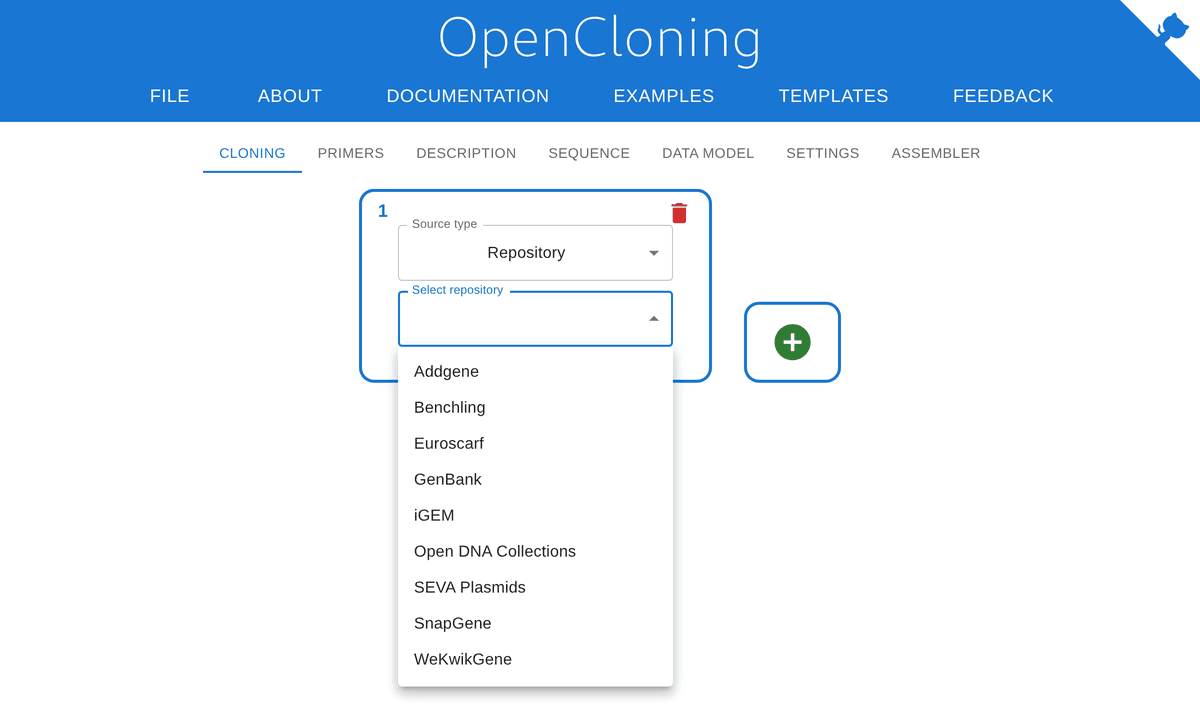
Figure 1. Import sources in OpenCloning v1.3.5. Nine repositories, including the ones a yeast or synthetic biology lab actually uses — Euroscarf, SEVA, iGEM, and the Reclone Open DNA Collections — not just Addgene and GenBank. Screenshot from my own self-hosted instance.
Euroscarf and SEVA in a default dropdown is a tell about who wrote this. So is Genome region, which pulls a locus straight out of an assembly by coordinates. If you've ever built a knock-in donor by copy-pasting coordinates between NCBI and SnapGene — and flipped the strand on your homology arms doing it — you'll recognise what that saves you.
The SnapGene importer deserves a specific mention: drop in a .dna file and OpenCloning parses the history out of it, not just the sequence. Your old constructs come across with their lineage intact. That's a deliberate decision to make leaving SnapGene easy, and it's unusual for anyone to build the on-ramp off a competitor's format.
The methods it actually simulates
This is where the molecular biology shows. OpenCloning doesn't just let you annotate "Gibson assembly" on an arrow; it runs the reaction in silico and refuses to give you a product if the chemistry doesn't work.
Supported, as of v1.3.5:
- PCR, with primer design and configurable melting-temperature parameters
- Restriction and ligation, with correct sticky-end handling
- Golden Gate, plus a MoClo-aware Assembler for combinatorial kit-based assembly
- Gibson, In-Fusion, in vivo assembly, and overlap-extension PCR
- Gateway BP and LR reactions
- Cre/lox, and custom phage recombinases where you define your own attB/attP sites
- Homologous recombination — integration, excision, and inversion
- CRISPR-HDR
- Oligonucleotide hybridization, polymerase extension, and templateless PCR
The homologous recombination and recombinase support is the standout. Most free tools stop at "cut and paste the fragments"; simulating strain engineering — a PCR cassette with 50 bp flanks integrating at a locus, then popping out again — is the daily work of a yeast or bacterial genetics lab and almost nobody models it properly.
The CRISPR-HDR implementation is honest about its scope in a way I appreciated. It asks for your gRNAs as protospacers (not full gRNA sequences) and then checks that they cut inside the region the donor will replace. If they don't, you get an error. That's a real and commonly-missed design check — if the cut site survives in your edited allele, Cas9 just cuts it again.
But read the docs carefully: it does not design gRNAs and it does not check off-targets. Those stay with CRISPOR, CHOPCHOP or Benchling. OpenCloning says so plainly in its own documentation, which is more than some tools manage.
A real example: URA3 into pUC19, from a script
The part that convinced me this is more than a nice interface is that the browser app and the Python library are the same engine. The backend is built on pydna — Björn Johansson's assembly simulation library, which has been around since a 2015 BMC Bioinformatics paper — plus Biopython and primer3.
So you can design in a script and open the result in the browser. Let's actually do it.
Install the library:
uv venv .venv
uv pip install --python .venv/bin/python opencloning
Grab the two starting sequences from NCBI — pUC19, and the URA3 locus from S. cerevisiae chromosome V:
curl -s "https://eutils.ncbi.nlm.nih.gov/entrez/eutils/efetch.fcgi?db=nuccore&id=L09137.2&rettype=gbwithparts&retmode=text" -o seqs/pUC19.gb
curl -s "https://eutils.ncbi.nlm.nih.gov/entrez/eutils/efetch.fcgi?db=nuccore&id=NC_001137.3&seq_start=116167&seq_stop=116970&rettype=gbwithparts&retmode=text" -o seqs/URA3.gb
Now the design. Cut the vector with EcoRI and HindIII, design primers to amplify URA3 at a 60 °C target Tm, add 30 bp overlaps so the product matches the cut vector ends, and assemble:
from pydna.parsers import parse
from pydna.design import primer_design, assembly_fragments
from pydna.assembly2 import gibson_assembly, pcr_assembly
from pydna.opencloning_models import CloningStrategy
from Bio.Restriction import EcoRI, HindIII

# 1. Load the two starting sequences
puc19 = parse("seqs/pUC19.gb")[0]
ura3 = parse("seqs/URA3.gb")[0]
puc19.name, ura3.name = "pUC19", "URA3_locus"

# 2. Linearise the vector: EcoRI + HindIII cut out the MCS
vector = max(puc19.cut(EcoRI, HindIII), key=len)
vector.name = "pUC19_EcoRI_HindIII"

# 3. Design primers for the URA3 ORF, then add 30 bp homology tails
amplicon = primer_design(ura3, target_tm=60.0)
fragments = assembly_fragments([vector, amplicon, vector], overlap=30)
fwd, rev = fragments[1].forward_primer, fragments[1].reverse_primer
fwd.name, rev.name = "URA3_gib_F", "URA3_gib_R"

# 4. Run the PCR as a recorded step, so it lands in the history
insert = pcr_assembly(ura3, fwd, rev, limit=18)[0]
insert.name = "URA3_PCR"

print(f"Forward primer ({len(fwd)} nt): {fwd.seq}")
print(f"Reverse primer ({len(rev)} nt): {rev.seq}")
print(f"PCR product: {len(insert)} bp")

# 5. Simulate the Gibson assembly
product = gibson_assembly([vector, insert], limit=25, circular_only=True)[0]
product.name = "pUC19-URA3"
print(f"Assembled plasmid: {len(product)} bp, circular={product.circular}")
print(product.history())

# 6. Export the strategy so the web app can open it
with open("pUC19-URA3_strategy.json", "w") as fh:
    fh.write(CloningStrategy.from_dseqrecords([product]).model_dump_json())
Running it:
Forward primer (56 nt): ACGACGTTGTAAAACGACGGCCAGTGAATTATGTCGAAAGCTACATATAAGGAACG
Reverse primer (48 nt): AAACAGCTATGACCATGATTACGCCAAGCTTTAGTTTTGCTGGCCGCA
PCR product: 864 bp
Assembled plasmid: 3443 bp, circular=True
╙── pUC19-URA3 (Dseqrecord(o3443))
    └─╼ GibsonAssemblySource
        ├─╼ pUC19_EcoRI_HindIII (Dseqrecord(-2639))
        │   └─╼ RestrictionEnzymeDigestionSource
        │       └─╼ pUC19 (Dseqrecord(o2686))
        │           └─╼ UploadedFileSource
        └─╼ URA3_PCR (Dseqrecord(-864))
            └─╼ PCRSource
                ├─╼ URA3_gib_F (f804 56-mer:5'-ACGACGTTGTAAAAC..ACG-3')
                ├─╼ URA3_locus (Dseqrecord(-804))
                │   └─╼ UploadedFileSource
                └─╼ URA3_gib_R (r804 48-mer:5'-AAACAGCTATGACCA..GCA-3')
Look at what that tree gives you for free. The 56-mer and 48-mer are real orderable primers with the homology tails already on them. The product is 864 bp — the 804 bp locus plus 60 bp of added tails, which is the arithmetic checking out. And o3443 says the assembly closed into a circle; if the overlaps hadn't matched, gibson_assembly would have returned nothing rather than quietly handing me a plausible-looking map.
Then File > Load cloning history from file in the browser, and the same strategy renders:
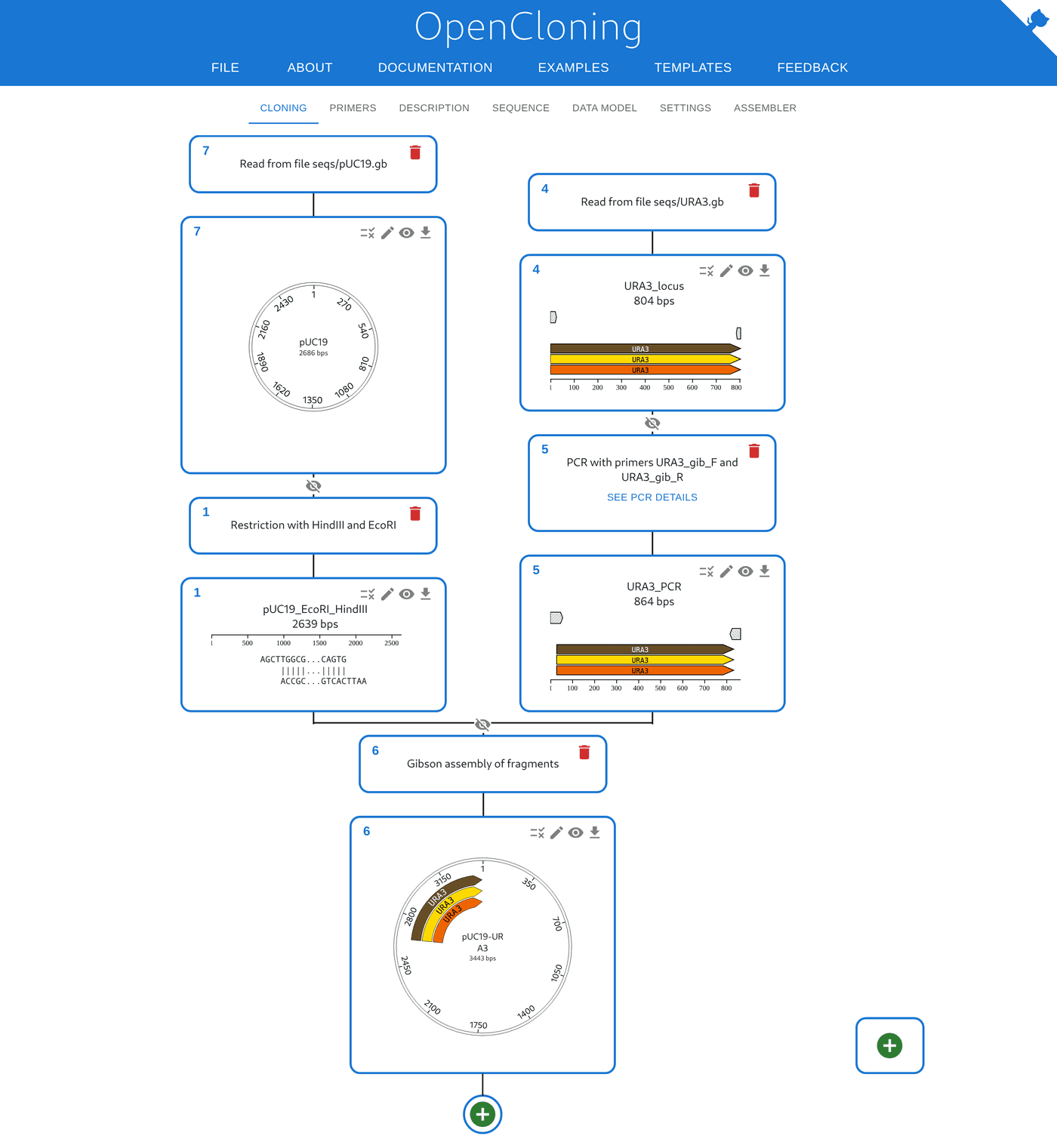
Figure 2. The same strategy as Figure 1's script, loaded into the web app. Two branches — cut vector and tailed PCR product — converge on a Gibson node and produce the 3443 bp circular product, with the URA3 annotation carried through from the GenBank record. Nothing was clicked to build this; it round-tripped from the Python script.
That round trip is the thing I'd point to if someone asked me what OpenCloning is for. A bench scientist can sketch a strategy in the browser and hand the JSON to a computational colleague who scales it to 96 wells in a loop. Or the reverse. Same model, same simulation, no translation step where the error creeps in.
The data model, and why FAIR isn't just a buzzword here
Click the DATA MODEL tab and you see what's actually being stored:
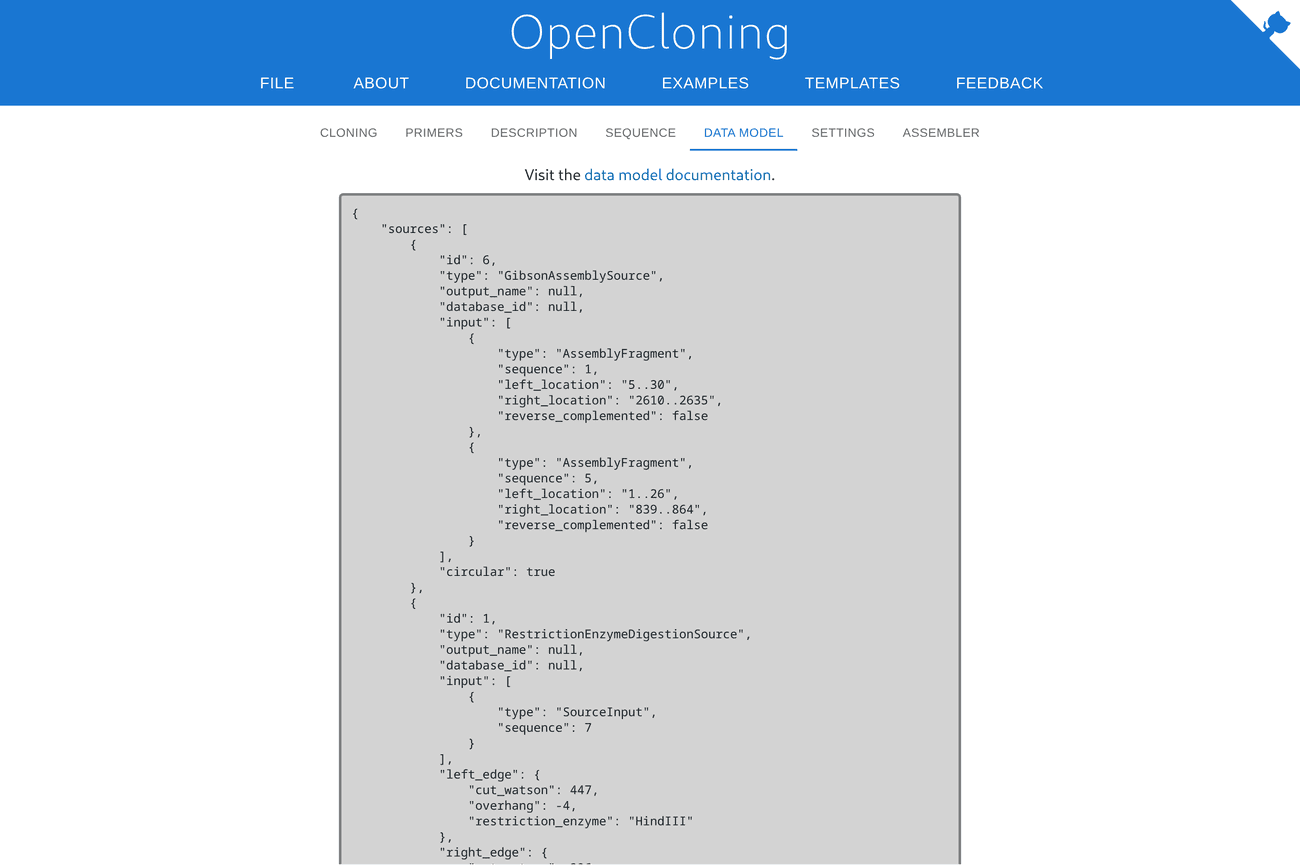
Figure 3. The cloning strategy as stored. The digest records the exact cut position, the overhang, and the enzyme; the Gibson records which coordinates of each fragment overlap. This is the file you'd attach to a paper.
The schema is defined with LinkML in a separate repository, which means it's versioned independently and generates validated code in several languages. My export reported schema version 1.0.0 against backend 1.10.0 — the model has reached a stable 1.0 even though the app is still moving fast.
Think about what this is for a second. Cloning in a methods section is prose: "pFoo was constructed by amplifying the X cassette with primers A and B and inserting it into the EcoRI site of pBar." Which EcoRI site? Which direction did it go in? That sentence is unreproducible often enough that most of us have lost a week to one.
A LinkML-validated graph of operations, each re-executable by a deterministic simulator, is a genuinely different artifact. It's the difference between a recipe someone typed from memory and one you can compile.
Self-hosting it
OpenCloning is MIT-licensed — frontend, backend, and data model. That's about as permissive as open source gets, and notably more so than the AGPL that a lot of academic lab software picks. You can run it, fork it, or embed it commercially.
The whole app — frontend and backend, in one container — comes up with one command:
podman run -d --name oc -p 8000:8000 docker.io/manulera/opencloning:latest
Or with Docker, identically:
docker run -p 8000:8000 manulera/opencloning
It's a 403 MB image. On my machine it was serving in 11.7 seconds from a cold start and sat at 277 MB of RAM idle:
curl -s http://127.0.0.1:8000/version
{
  "backend_version": "1.10.0",
  "schema_version": "1.0.0",
  "opencloning_version": "v1.3.5",
  "opencloning_version_int": 10305
}
No database to provision, no migrations, no .env to fill in before it will start. For a lab that wants to try something without filing a ticket with IT, that's about as low as the barrier goes. The docker-compose.yml in the repo adds an optional pLannotate container for automatic feature annotation, and turns on the experimental Assembler.
The configuration options are the ones a cautious institution asks about. NO_EXTERNAL_REQUESTS=true cuts off outbound traffic entirely. ALLOWED_EXTERNAL_URLS whitelists specific repositories instead. There's HTTPS support, a proxy setting, CORS origins, and a cap on how much sequence the backend will pull from NCBI in one go. The compose file runs the container read_only with a tmpfs — a small detail, but one that says someone thought about deployment rather than just it works on my laptop.
One thing that bit me: importing from Addgene on a self-hosted instance fails with a clear message that ADDGENE_USERNAME and ADDGENE_PASSWORD must be set, with a pointer to the Addgene Terms of Use. That's a licensing constraint rather than a bug, and the error is honest about it, but it means a self-hosted instance is not feature-identical to the hosted one out of the box. The NCBI route works with no credentials at all — I pulled pUC19 by accession L09137.2 on a fresh container and it came back in a couple of seconds.
How it stacks up against what you're using
| OpenCloning | SnapGene | Benchling | Geneious | |
|---|---|---|---|---|
| Cost | Free | ~$500+/seat/yr | Free academic tier | Paid |
| Licence | MIT, open source | Proprietary | Proprietary | Proprietary |
| Self-hostable | Yes, one container | No | No | Desktop only |
| Cloning history | Open JSON, re-runnable | In .dna, proprietary | Partial, manual | Limited |
| Scripting | Python (pydna), same engine | Limited | API | Limited |
| Recombination / strain engineering | Strong | Weak | Weak | Weak |
| gRNA design + off-targets | No | Basic | Strong | Basic |
| Inventory / registry | Not yet | No | Strong | No |
| Map drawing polish | Functional | Excellent | Good | Good |
Read that table honestly: SnapGene is still a nicer place to look at a plasmid, and Benchling is still the better system of record for a lab that needs inventory, permissions and a registry. OpenCloning wins on provenance, on recombination biology, on scripting, and on the fact that nobody can take it away from you.
The honest weak points
It's effectively a one-person project. The lead developer, Manuel Lera-Ramírez (UCL, previously a biocurator at PomBase), has 389 commits to the frontend and 365 to the backend. The next human contributor has six. Björn Johansson maintains pydna underneath and Daniel García-Ruano contributes use cases, but if Manuel takes a job outside academia, this stalls. That's not a criticism of the code — it's the standard risk profile of academic research software, and you should price it in before making it the only record of your constructs. The MIT licence and the open data model are the mitigation: your JSON stays readable even if the app stops.
There's no peer-reviewed paper on OpenCloning itself. pydna has its 2015 BMC Bioinformatics paper, but I could not find a publication for OpenCloning in PubMed or on the preprint servers. For a tool you'd cite in a methods section, that's a real gap — both for your citation and for the project's own sustainability case to funders.
No inventory, yet. State lives in JSON files you download. There's no searchable database of "every plasmid and primer this lab owns", so you'll keep that in an ELN or a spreadsheet. An OpenCloningDB with a Postgres backend is in active development in the backend monorepo, but it isn't shipped in the single-container app.
Primer design doesn't cover everything. Homologous recombination, Gibson, In-Fusion, in vivo assembly, overlap-extension and Gateway all have primer design. Golden Gate primer design is listed as "Coming soon" in the docs, as is the templates page. Designing your own BsaI overhangs by hand in 2026 is a chore.
No gRNA design or off-target prediction. Stated plainly above, but worth repeating, because "CRISPR support" on a feature list can read as more than it is.
The interface is functional, not beautiful. It's Material UI with a blue bar. Everything is where you'd expect and nothing is slow, but if your lab chose SnapGene partly because it's pleasant to use, this will feel like a step down in polish even as it's a step up in capability.
What I'd want next
If I had the developers' ear for ten minutes, this is the order I'd argue for.
Finish the primer design. Golden Gate and Gibson overhang design are the daily friction points, and Golden Gate is still listed as coming soon. Designing BsaI overhangs by hand in 2026 is a chore, and the feature that would really earn its keep is a domestication warning — flag internal restriction sites in a part and suggest the silent mutations that remove them. That's the error that costs you a failed assembly and a week.
Ship a turnkey "lab mode." A docker-compose that brings up the inventory database alongside the app, even a minimal one. The question I'd want it to answer is the one I ask a spreadsheet a dozen times a month: which primers already in our −20 °C freezer bind this template? That single query is what turns this from a very good calculator into something a lab runs on.
Close the loop with whole-plasmid sequencing. This is the one I'd put real money on. OpenCloning already aligns Sanger traces, but plasmid validation has largely moved to cheap whole-plasmid long-read sequencing — most of us now just send a tube to Plasmidsaurus and get the full construct back. Let me attach that consensus to the terminal node of a cloning tree and have the software certify that the physical prep matches the simulated design. A cloning history whose final node reads "verified against this read set" is a fundamentally stronger object than one that stops at the plan.
Publish a paper. Partly so there's something to cite in a methods section, but mostly because a citable paper is what sustains academic software through the lead developer's next career move.
One last thing that looks like a software-engineering footnote and isn't. The LinkML schema and the experimental MCP server, taken together, set up two things nothing else in this space offers: auto-generating a methods paragraph guaranteed to match what was actually done, and giving an AI assistant a sandbox where every proposed cloning step has to biochemically compile before a human ever sees it. Anyone who has watched a chatbot confidently hand over a primer pair that doesn't anneal can see why a simulator in the loop is the right shape for that problem.
The caveat on all of it: a formally-specified data model only helps reproducibility if more than one tool speaks it. Right now OpenCloning's format is excellent and nearly unique — which is exactly the position from which standards either get adopted or quietly die.
Who should use this
Try it today if you run a yeast, bacterial or synthetic biology lab doing recombination-based strain engineering; if you use MoClo or Golden Gate kits and want combinatorial assembly scripted; if you're priced out of SnapGene or uneasy about Benchling's academic tier changing; if you teach cloning and need something students can use without a licence; or if you simply want your constructs' history in a format you own.
Stick with what you have if your work is CRISPR screening that needs integrated gRNA design and off-target scoring, if you need a validated inventory with permissions and audit trails today, or if your lab's tolerance for unpolished software is low. "It's free and open source" is not by itself a reason to change a working system.
What I'd actually do: use it alongside your current tool, not instead of it, for the next few constructs. Design something real in it, export the JSON, and see whether a colleague can open it and understand what you did. That's a half-hour test and it tells you more than any review — including this one.
The broader point is worth saying plainly. A single postdoc, standing on an open-source simulation library that's been maintained for a decade, has built something that does things the commercial incumbents don't, released it under MIT, and made it self-hostable in one command. That's a good day for the field regardless of whether this particular tool ends up in your lab.
Resources
| Resource | What it is |
|---|---|
| opencloning.org | Project site, getting started, changelog |
| app.opencloning.org | The hosted app — free, no account |
| docs.opencloning.org | Documentation, per-method guides |
| OpenCloning on GitHub | Main repo, MIT licence, Docker setup |
| OpenCloning backend | FastAPI API, CLI, experimental MCP server |
| OpenCloning LinkML model | The data model, versioned separately |
| pydna | The Python simulation engine underneath |
| Demo video playlist | Walkthroughs of each feature |
| eLabFTW integration | Using it from the eLabFTW ELN |
| Open DNA Collections | Reclone's open plasmid distributions, importable directly |
Reviewed on 2026-11-09 against OpenCloning v1.3.5 (backend 1.10.0, schema 1.0.0, pydna 5.5.16), self-hosted from the published container image. This review is independent — I have no relationship with the developers and received nothing for writing it.
Are you still keeping your cloning history in a folder of .dna files and a notebook page? Or has your lab found something that actually works? Drop a comment below.
Keep reading
The free wet-lab software stack: open-source replacements for GraphPad Prism, SnapGene, FlowJo, and BioRender
A five-person molecular biology lab easily spends $6,000 a year on per-seat subscriptions for Prism, SnapGene, FlowJo, and BioRender. I tested the free, open-source replacements on real bench data — from 4PL IC50 curves and diagnostic digests to FCS gating — and looked honestly at where the free stack wins and where it still hurts.
BenchOS: a free, self-hosted lab operating system for molecular and structural biology
A Harvard structural biology lab just open-sourced the software it runs its own bench on — notebook, registry, cryo-EM grid tracking, and an AI agent, all self-hosted under AGPL. I installed it and ran it. Here is what actually works, and what you should know before trusting it with your lab records.
CellPAINT: The Free Tool That Turns Molecular Biology Into Art
An in-depth look at CellPAINT — the free, scientifically accurate molecular painting tool from Scripps — and how it compares to BioRender, ChimeraX, PyMOL, and other illustration platforms.